
Quick Resume lets you power your handheld off in the middle of a game and, next time you turn it on, drop straight back into that exact moment. No load screen, no main menu, no reloading your save. It is one of the nicest things about GammaOS Nano.
What it does
When Quick Resume is on and you power off (or reboot) while a game is running, Nano quietly saves your exact spot first. On the next boot it relaunches that same game and restores the moment you left, so turning the handheld on feels like waking it from sleep.
Quick Resume is available for RetroArch games and DraStic (Nintendo DS) games only. Standalone emulators such as PPSSPP, AetherSX2, Flycast, and Mupen64Plus do not support it, so those simply start fresh.
Turning it on or off
Quick Resume is off by default, so every boot starts at the home until you choose otherwise. Turn it on in either of two places:
- Settings > Game Settings > Quick Resume (On or Off).
- Quick Menu > Quick Resume, which opens the same On/Off choice.
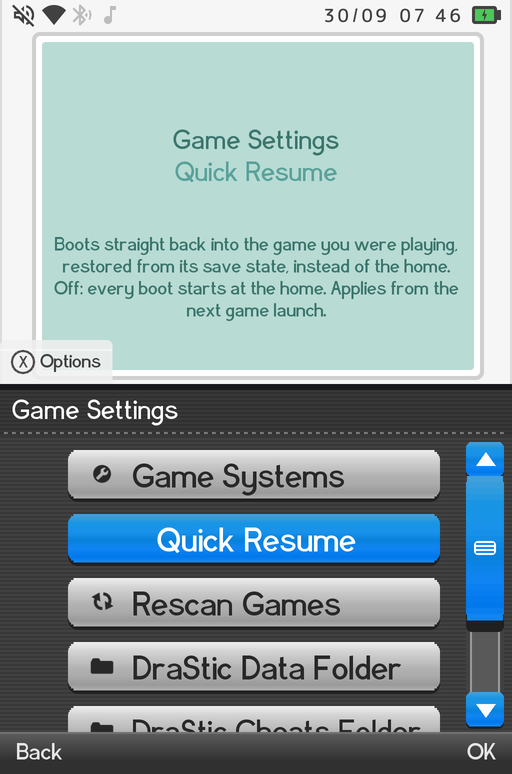
The change applies from the next game you launch. When it is on, the next power off from inside a supported game arms the resume. When it is off, every boot starts at the home and games start from their own boot screen.
How it works, per emulator
DraStic (Nintendo DS)
DraStic gets the most seamless Quick Resume. When you power off inside a DS game, Nano force-saves to DraStic's reserved autosave slot and, on the next boot, relaunches straight into the paused game with no load screen at all. It is as close to instant as it gets.
If a previous save was cut short (for example the battery died mid-write), Nano notices the incomplete autosave, sets it aside, and boots that game fresh instead of loading something broken. Your other saves are untouched.
One exception: RetroAchievements hardcore mode always boots fresh, because hardcore rules do not allow resuming from a saved state.
Leaving a resumed DS game is always safe: hold Back as usual and the home comes back, even straight after a Quick Resume boot. (In 1.4.2 and earlier this could leave the screen frozen on the last frame, and a reboot resumed the game again. That loop is fixed in 1.4.3.)
As an extra safety net, if the device resumes a game twice in a row without you pressing any button in between, the next boot lands on the home instead of resuming a third time.
RetroArch
For RetroArch games, powering off arms a resume marker with the core and the game. On the next boot Nano relaunches that game through RetroArch. RetroArch then handles restoring your progress with its own save and state system.
Tips
- Quick Resume works hand in hand with the normal sleep and wake behavior. A short Power press just sleeps the device; Quick Resume is about surviving a full power off or reboot.
- Because it saves on the way out, give the device a second to finish writing before you pull it off a charger or swap an SD card.
- Only one game is armed at a time: the one you were last playing.
Where to go next
- Emulators for how games launch in the first place.
- DraStic Nano for everything about the built-in DS emulator.
- Controls for sleep, wake, and the in-game overlay.